Executive Summary: From Amateur to Professional
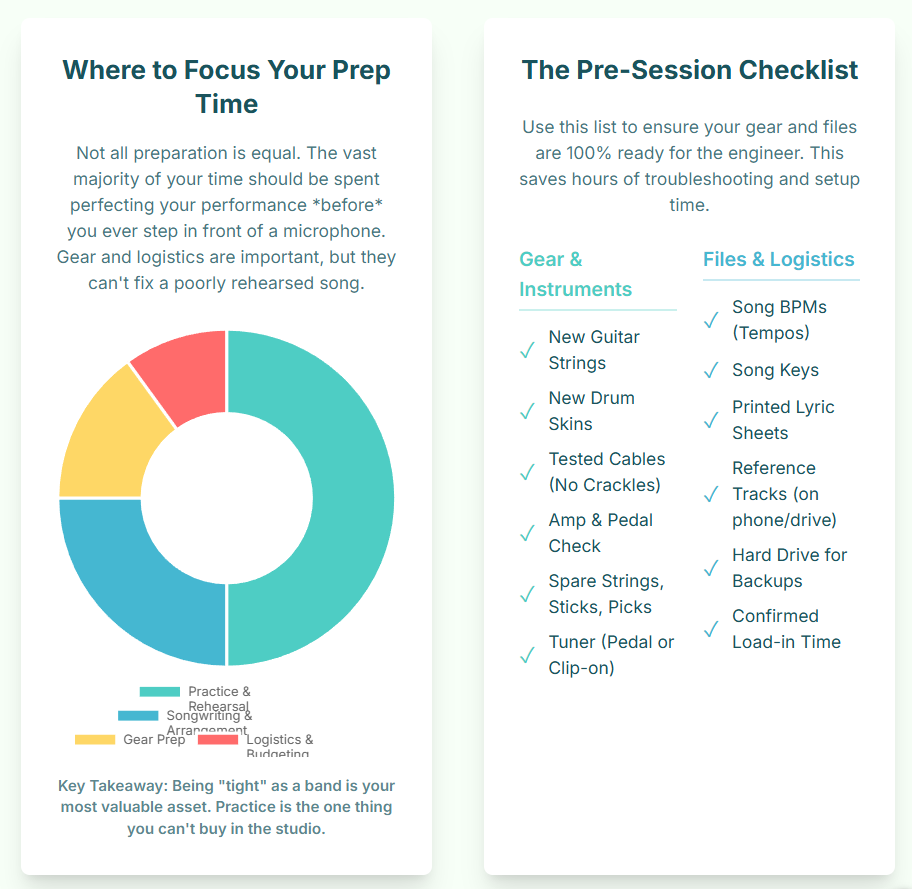
Entering a professional recording studio for the first time is a significant milestone. The studio environment functions as a "magnifying glass," amplifying not only the music but also the level of preparation. A recording session is a high-pressure, time-sensitive, and expensive endeavor.1 Its success or failure is almost always determined before the artist walks through the door.3 This report provides a comprehensive, professional-level methodology for preparing for a first studio session. Its purpose is to equip the artist with a systematic process that ensures their time and financial investment are spent capturing a creative, high-quality performance, rather than diagnosing and fixing avoidable problems.1 This preparation is categorized into eight critical phases: musical finalization, technical rehearsal, documentation, engineer communication, logistical packing, personal conditioning, studio etiquette, and data management.
I. The Foundation: Transforming Your Song from Rehearsal to Record-Ready
The pre-production phase is the single most vital component of a successful recording project.3 It is here that the song is fundamentally finalized, moving from a concept suitable for live performance to a tight, deliberate arrangement suitable for recording.4
Finalizing the "Big Three": Structure, Tempo, and Arrangement
Before any technical preparation, the music itself must be locked in. Wasting paid studio time to debate a song's tempo or structure is the most common and costly mistake a new artist can make.1
Song Structure: The exact order and length of every section must be finalized.5 This includes the precise number of bars for the intro, verses, choruses, bridges, solos, and outro.5
Tempo (BPM): The tempo must be determined and locked using a metronome.5 This is measured in beats per minute (BPM). If the song includes intentional tempo changes (e.g., a ritardando at the end or a faster chorus), these must be "mapped" to the specific bar number where they occur.6
Arrangement: The instrumental arrangement must be solidified.5 This means deciding which instruments play what parts in which sections.
These three elements are not a sequential checklist; they are an interdependent system. A change in tempo will fundamentally alter the feel of an arrangement; a riff that sounds powerful at 90 BPM may sound rhythmically cluttered at 100 BPM.6 Similarly, altering the structure (e.g., cutting a verse in half) necessitates a change in the arrangement and the tempo map. These three components must be finalized as a single, cohesive unit.
The Professional Art of Subtraction: "K.I.S.S."
Arrangements designed for a live venue are often intended to sound "big" to fill a noisy room, which typically results in every band member playing at all times. In the studio, this approach creates a "confusing" and "cluttered" wall of sound.6 The "K.I.S.S." (Keep It Simple, Stupid) rule is paramount.7 Professional arrangements are often sparse, allowing a single melodic idea to have its own space and dominate the listener's ear.8
Pre-production, therefore, is an act of creative subtraction. The artist's goal should be to identify the one essential element of a song and subtract everything that does not support it. This is often achieved through dynamic variation, such as removing instrumentation during verses and re-introducing it in the chorus to create a sense of movement and impact.9
The Demo: Your Rough Draft
Recording a demo, even a low-quality one, is a mandatory step.6 The demo serves as the artist's first opportunity to critically evaluate the song as a listener, not a performer. This process reveals "out-of-key notes or chords, abrupt changes, [or] rhythmically/harmonically cluttered sections".6 By listening to the demo, artists can "mute" tracks to test their subtraction theory: does the song sound cleaner or more powerful without a specific part?10 This is the final opportunity to fix foundational issues before the clock is running. This demo also becomes a critical communication tool for the engineer.11
Table 1: The Pre-Production Finalization Checklist
This checklist represents the non-negotiable decisions that must be finalized before booking studio time.
II. Mastering the Grid: The Click Track and Your Internal Clock
The single greatest technical failing of a first-time artist is the inability to perform consistently to a click track (the studio's metronome).13
Why the Click is Non-Negotiable
A click track is not an aesthetic choice to make music "sound like a computer".10 It is a technical necessity for modern production. Almost all contemporary editing techniques—such as compiling the best parts of several takes, copying a chorus, or looping a section—require that the performance is recorded to a fixed tempo grid.13 Attempting to edit a song that speeds up and slows down ("drifts") is described by engineers as "murder".13
The "Feel" vs. "Grid" Fallacy
A common objection is that a click track destroys the "feel" or natural "dynamics" of a performance.14 This argument is often a misunderstanding of where "feel" originates. While it is true that legendary bands like The Beatles and Led Zeppelin recorded without clicks, their drummers had "great timing and feel" from years of practicing to a metronome. Their "feel" was demonstrated by their ability to play consistently.
A cautionary tale illustrates this point: a band that had not practiced to a click track decided to use one in the studio.14 The resulting recording was not "tight"; it was "tentative," because the drummer was uncomfortable and fighting the click rather than playing with it. The problem was not the click track; it was the band's lack of preparation. An artist must master the click before they can earn the creative right to abandon it. For a first session, it is a non-negotiable technical skill.
How to Practice
Rehearsing to a click track must begin weeks or months before the session.14
Practice Songs, Not Scales: Musicians should practice playing their finalized songs to a click, not just technical exercises.15
Use Musical Loops: Many musicians find the "cleek-clock" of a metronome to be sterile or "annoying".13 A simple drum loop or a drum VST (virtual instrument) programmed to the correct tempo provides the same timing information in a more musical and groove-oriented way.15
Develop the Internal Clock: To truly master timing, musicians can practice to a click that is subdivided. For a song at 120 BPM, a musician can practice with the click at 60 BPM (clicking on beats 1 and 3) or even 30 BPM (clicking only on beat 1). This forces the musician to be responsible for the space between the clicks, which helps "develop and trust your internal clock".16
III. The Blueprint: Preparing Professional Documentation for the Session
In the high-pressure, often-fatiguing studio environment, an artist's memory is unreliable.17 Professional documentation is the "industry standard," and arriving without it signals a lack of professionalism.18 These documents are not just for the artist; they are the primary communication blueprint for the engineer and any session musicians.
These documents function as a professional filter. Handing an engineer a clean, typed, industry-standard chart builds immediate respect and establishes a common language, which accelerates the entire session.18 A smudged, handwritten note does the opposite.
The Three Essential Documents
Lyric Sheets: This document is for the vocalist. It must be typed, never handwritten.18 It should use a simple, clear font (e.g., Arial) and include clear section names (e.g., [Verse 1], [Chorus]) above each block of text.19 Crucially, the lyric sheet should not contain chord symbols, as these are a "distraction" for the vocalist.18
Chord Charts: This is a separate document for the instrumentalists. It clearly displays the song's harmony, either with chords placed above the corresponding lyrics 20 or in a "bracket format" (e.g., "Your [G]praise will ever be on mylips").20 It should also note the tempo and time signature.21
The Nashville Number System (NNS): For sessions involving professional studio musicians, the NNS is the professional standard.21 This system uses numbers (1-7) to represent the chords relative to a key. Its primary advantage is flexibility: it "allows you to change keys on the spot without having to re-write charts".21 If a vocalist finds the key is too high, the entire band can transpose instantly and flawlessly.
IV. The Pre-Session Briefing: Aligning Your Vision with Your Engineer
The engineer is a creative ally, but they "can't read your mind".10 A 30-minute pre-session consultation (which should be free) is essential for aligning the artist's vision with the engineer's technical execution.23
Establishing Your Goals and Vision
In this meeting, the artist must clearly define their goals.24 How many songs will be recorded?26 What is the intended final product (a demo, an EP for mastering)? The artist should also inform the engineer of the exact instrumentation so the engineer can "have microphones and tracks... ready to go".5
While descriptive "vibe" words like "moody," "powerful," or "intimate" are a good starting point 11, they are subjective. This is where reference tracks become the single most important communication tool.
The Power of Reference Tracks
A reference track is a professionally produced song by another artist that represents the sonic goal for the current project.27 It serves as the objective bridge between the artist's subjective language ("warm") and the engineer's technical physics (EQ, compression, microphone choice).28
For example, an artist's request for a "warm vocal" could mean using a specific microphone, boosting a certain frequency, or adding tube saturation—three different, time-consuming setups. By providing a reference track, the artist gives the engineer an objective target.29 The engineer can analyze that track and identify the exact technical properties the artist is associating with the word "warm."
Artists should bring 2-3 tracks and be specific, saying, "I love the drum sound on this track" or, "I want my vocal to have the reverb of this track".10 These tracks should be high-quality (e.g., WAV files), not compressed MP3s or streaming links.33
What to Send the Engineer in Advance
Following the pre-session briefing, the artist should email the engineer a folder containing:
The Demos: The rough demos recorded during pre-production.11
The Reference Tracks: The high-quality files for the agreed-upon references.31
The Documentation: PDFs of the lyric sheets, chord charts, and tempo maps.6
A "Rough Mix": A stereo "2-track" (a simple stereo bounce) of the best demo.34 This shows the engineer the artist's current vision for the relative balance of the instruments.
This package must come with a warning, however. Artists often fall victim to "demo-itis"—the state of listening to their own rough mix so many times that its flaws become part of the song's identity.35 When a professional engineer "fixes" these flaws (e.g., turning down a guitar that was mixed too loud in the demo), the artist may feel the mix is "wrong".36 The artist must communicate to the engineer which elements of the demo are intentional and which are simply placeholders.
V. The Artist's Go-Bag: A Definitive Guide to Gear, Logistics, and Data
This section comprises the definitive packing list, covering instrumentation, "consumables," and data management.
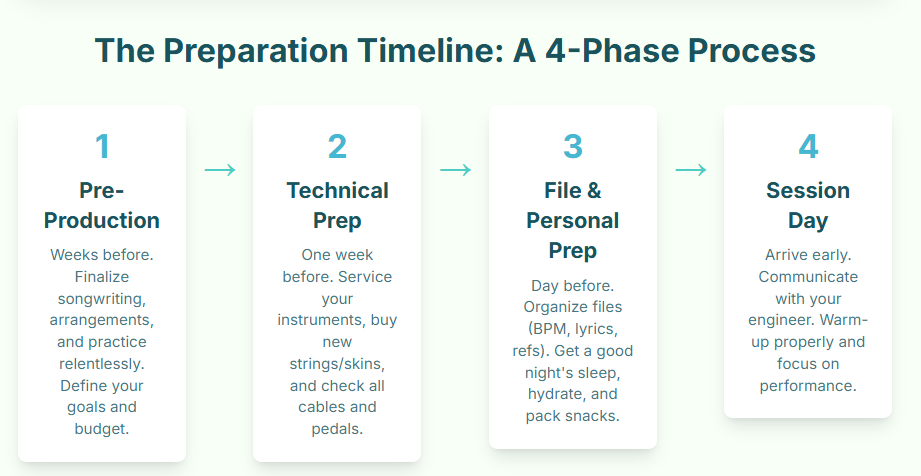
What the Studio Provides (and What to Ask)
Professional studios provide the high-end infrastructure: microphones, preamps, consoles, studio monitors, and an acoustically treated environment.37 They also typically have a "house kit" (drums) and other large, heavy instruments like a grand piano or a Hammond organ.37
However, artists must ask in advance what is available.41 Does the house drum kit include cymbals, or must the drummer bring their own? Do they have the specific guitar amplifier the artist wants?
What You Must Bring: Your Instruments
Artists should bring the instruments they have practiced on and are comfortable with.17
Guitars/Bass: Bring the primary instrument and a backup. All instruments must be professionally "set up" (intonation and action adjusted) before the session.10
Drums: Drummers will often use the house kit shell pack 40 but must bring their own "breakables"—the items that define their sound: snare drum, cymbals, and kick drum pedal. It is advised to bring the "highest quality cymbals you can".10
Keyboards: Bring all MIDI controllers, synthesizers, and the necessary power and USB cables.42
The Consumables: Your "Time is Money" Insurance
"Consumables" are the small, inexpensive items that will fail. Their failure will halt the entire session, which is billed by the hour.1 A $10 pack of new strings is not a $10 expense; it is insurance against a $100-per-hour delay while the guitarist drives to a music store.17 An artist does not pack for "what if"; they pack for "when."
Table 2: The Artist's Essential Gear & Consumables Pack-List (by Instrument)
Data Management: Your Hard Drive
The artist must bring their own external hard drive to receive the session files.10 This drive must be formatted correctly before arriving. Most studios are Mac-based and run Pro Tools or Logic, requiring a drive formatted as APFS (for modern SSDs) or Mac OS Extended (Journaled) (for older HDDs).51 A Windows-based studio may require NTFS.53 The artist must call the studio and ask what format they require.
VI. Preparing the Performer: Physical, Vocal, and Mental Fortitude
The artist's body is their primary instrument. A tired, hungry, or anxious performer cannot deliver a great take, regardless of their technical skill. The preparation of the "human element" is a key, and often-overlooked, factor.
The Night Before: The Power of Sleep
Getting a full night of quality sleep is non-negotiable.5 Sleep deprivation has a direct, negative impact on performance: it slows memory recall, making it difficult to remember complex parts or lyrics.56 For vocalists, sleep is when the vocal cords repair tissue damage and rehydrate. A lack of sleep leads directly to vocal fatigue and "increases the risk of injury".58
Diet and Hydration: Fueling the Session
Artists must begin hydrating hours before the session and bring a large water bottle.45 Room-temperature water is ideal, especially for vocalists.48
Foods to Eat: Lean proteins (chicken, fish, tofu), fruits, vegetables, and unsalted nuts provide sustained energy.54
Foods to Avoid:
Dairy (milk, cheese): Increases phlegm and "mouth noise".55
Sugar, Greasy/Spicy/Salty Foods: Can cause energy crashes and acid reflux.60
Caffeine and Alcohol: Act as diuretics, dehydrating the body and vocal cords.60 Caffeine can also amplify anxiety.
Logistics: Artists should bring their own healthy snacks and (non-strong-smelling) meals.45 One cannot assume the studio will provide food, and relying on delivery wastes time.64
Vocal Preparation (For Everyone)
Vocalists must be warmed up before arriving at the studio.54 Studio time is for recording, not for scales. A standard warm-up routine (humming, lip trills, sirens, straw phonation) should be completed at home.49 A shorter, 15-minute warm-up can be done just before recording.54
Mental Preparation: Defeating "Red Light Fever"
"Red Light Fever" is the common performance anxiety that occurs the moment the red "record" light illuminates.62 The most effective strategy for managing this psychological anxiety is to first eliminate all physical agitators. Arriving sleep-deprived 56, over-caffeinated 62, or hungry 48 guarantees that baseline anxiety will be amplified.
Once the physical state is managed, mental strategies can be employed:
Practice Performing: Record yourself at home, even on a phone, to simulate the pressure of a "take".54
Reframe Anxiety: The physical symptoms of anxiety (fast heart rate) are identical to those of excitement. An artist can mentally re-label the feeling from, "I'm anxious," to, "I'm excited".67
The "Practice Run" Trick: Engineers often tell a nervous performer, "Let's just do a practice run," while secretly recording.68 The artist relaxes, performs perfectly, and the engineer announces they "got the take." An artist can use this trick on themselves by adopting the mindset that "this take doesn't count".69
Trust the Process: A final recording is rarely one perfect take. It is a "composite" (or "comp") of the best parts of many takes.70 The goal is not one perfect performance, but several good ones.
What to Wear
The studio environment itself is an antagonist to human comfort. Soundproofing requires a sealed room with "no fresh air" 63, and the equipment necessitates powerful, "cold" air conditioning that makes the air "dry".64
Comfort and Layers: Wear comfortable, loose clothing. Bring layers, such as a hoodie, as the studio will be cold.50
Quiet Fabrics and Shoes: Avoid noisy fabrics like nylon or polyester that can rustle and be picked up by sensitive microphones.50 Wear soft-soled shoes that do not click or squeak on the floor.50
Table 3: Studio Day Personal Pack-List (Non-Musical)
VII. The Unwritten Rules: A Guide to Professional Studio Etiquette
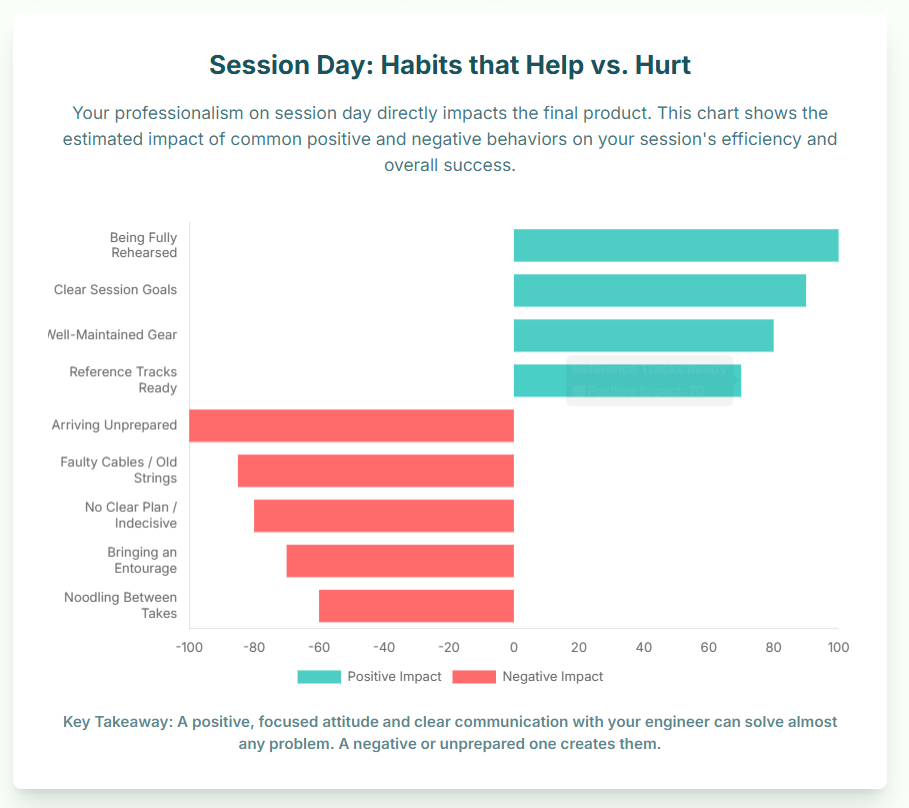
How an artist behaves in the studio is as important as how they play. Good etiquette is not about politeness; it is about demonstrating respect—for the time, the expensive gear, and the people.72 This respect builds the professional trust necessary for the engineer to become an invested collaborator rather than a passive technician.23
Punctuality is Respect: Be on time.74 "On time" in a studio context means arriving 15 minutes early to "load-in" and be ready to start at the "downbeat" (the official start time).76
The Entourage Stays Home: This is the most critical and most frequently violated rule. Do not bring friends, family, or significant others.6 They are "counter-productive" 6 and a "distraction".48 The deeper issue is psychological: making music is an "intimate and personal experience that requires... vulnerability".79 An artist cannot be vulnerable or experimental 80 while being judged by an "audience" on the couch. Only personnel essential to the recording (e.g., the producer) should be present.6
Respect the Space and Gear: Do not touch any equipment, especially microphones, without the engineer's explicit permission.74 Keep all food and drinks far away from the mixing console and gear racks.78 Clean up all personal trash before leaving.75
Communication is a Two-Way Street: Trust the engineer's expertise and be open to feedback.25 At the same time, the artist is the client.2 If something sounds wrong or the artist is uncomfortable, they must speak up clearly and politely.74
Stay Focused: The studio is a professional workplace. Arriving drunk or high is unprofessional and guarantees a poor performance.78 Phones should be silenced, and non-essential chatter kept to a minimum.79
Table 4: Studio Etiquette: Quick-Reference Do's and Don'ts
VIII. The Final Checklist: Session Workflow and Walking Away with Your Files
This final phase covers the workflow during the session and the critical data-management process at the end of the session.
The Session Workflow: Taking Notes
After hours of listening, "ear fatigue" will set in, making objective decision-making impossible.10 The band will not remember which take of the vocal was the best. For this reason, one person (ideally a producer or a band member who is not currently playing) must be designated as the "scribe".6 This person sits in the control room with a notebook 44 and logs every take.71
An example log might read: "Guitar Solo - Take 1 (Good feel, flat note at end), Take 2 (Technically perfect, no feel), Take 3 (Amazing! Use this)." This logbook is the "recipe book" 82 and the session's only objective memory. It is the single most important tool for navigating the "comping" (compiling) and mixing process later.
Getting Your Files: The Most Important 15 Minutes
At the end of the session, the artist must collect their data using the external hard drive they brought.10 It is essential to use the correct terminology to avoid confusion.83
"Stems" vs. "Multitracks" vs. "Session File"
These terms are not interchangeable.
Multitracks (or "Raw Audio"): This is what the artist needs for a professional mix. It is a folder containing every single microphone and instrument as a separate, raw WAV file (e.g., "Kick In.wav," "Snare Top.wav," "Bass DI.wav," "Lead Vocal.wav").83
Stems: These are grouped tracks, typically combined by the engineer into stereo files (e.g., a single "Drums.wav" file, a "Guitars.wav" file, etc.).84 These are used for remixes, not for mixing. Asking for "stems" when one means "multitracks" is a common error that can cause friction, as the engineer may get "weird" or "concerned" that the artist intends to release a pre-mixed, unfinished product.83
The Session File: This is the project file from the engineer's software (e.g., "Song_Title.ptx" for Pro Tools).85 The artist should also request this file, as it contains all the session organization, edits, and microphone notes.
The artist should hand the engineer their hard drive and make this specific, professional request: "Could I please get the session file, plus a folder of all the raw, consolidated multitracks exported as WAV files?"
Conclusion
A professional recording studio is one of the most powerful tools in an artist's career. It is also an expensive and unforgiving environment for the unprepared. The methodology detailed in this report provides a comprehensive framework for transforming the studio session from an intimidating, high-risk expense into a productive, efficient, and creative experience.
By systematically finalizing the musical material, mastering the technical skill of playing to a click, preparing professional documentation, and clearly communicating the artistic vision, the artist removes the primary sources of friction and wasted time. By managing the logistical, physical, and psychological variables—from packing spare strings to getting adequate sleep—the artist replaces anxiety with process. This preparation ensures the artist walks into their first session not as an amateur, but as a professional ready to create.
Booking your first session at a professional podcast studio is a massive step. It’s exciting, but it can also be daunting. The key to making the most of your investment and ensuring a flawless recording is preparation. Arriving unprepared can waste valuable studio time, spike your stress levels, and ultimately cost you money.
This checklist will guide you through everything you need to do before you walk through the doors, whether you're recording with us at Finchley Studio or any other professional space, to ensure your session is smooth, productive, and fun.
1. Pre-Production & Content (Two Weeks Before)
Finalise Your Script or Outline: This is the most crucial step. Do not try to "wing it," especially on your first time. Have a clear, timed-out script or a detailed bullet-point outline. Know your intro, key talking points, segments, and your outro.
Share All Materials with Guests: Ensure your co-hosts or guests have the outline, any specific questions, and the recording details (date, time, location) well in advance. This prevents last-minute confusion and ensures everyone is on the same page.
Do a Timed Rehearsal: Run through the script with your co-host or by yourself. Does your "30-minute" episode actually take an hour to read? Professional studios are booked by the hour, so knowing your timing is crucial for sticking to your budget and getting all your content recorded.
2. Logistics & Technical (One Week Before)
Communicate with the Studio: Touch base with the studio team. Confirm your booking time, number of participants, and any specific technical needs. For example, if you need a specific set layout, are bringing in a remote guest via a laptop, or have video requirements, let them know. A professional studio like Finchley Studio can have everything set up and ready, saving you precious time.
Confirm Your Guests (Again): A week out, send a friendly reminder to all participants. Confirm they have the date, time, and address. This is also a good time to share any parking or transport information.
-
Plan Your (and Your Guests') Attire (for Video): If you're shooting video, clothing matters.
Avoid: Busy patterns, fine stripes (which can "moiré" on camera), logos (unless they are yours), or all-black/all-white, which can be hard to light.
Advise: Solid, jewel-toned colours often look best on camera.
Remind: Advise against noisy jewellery like dangling earrings or bracelets, as they can be picked up by sensitive studio microphones.
3. Day-Before Prep (24 Hours Before)
-
Pack Your "Go-Bag": Get everything ready the night before so you’re not rushing. Include:
Your script/notes (on a tablet to avoid paper rustling, or printed single-sided).
A laptop and charger (if needed for remote guests or notes).
A portable hard drive or high-speed SD card. (Check studio policy—some, like Finchley Studio, may handle file delivery for you, but it's always good to be prepared).
Bottled water (with a secure cap!).
Any branding or props you want on set.
Rest Your Voice and Body: Don't shout all night at a concert before your session. Get a good night's sleep. Avoid dairy or overly spicy foods, which can affect your voice. Drink plenty of (non-alcoholic) fluids.
Send a Final Confirmation: Send one last "see you tomorrow!" text or email to your guests with the studio address and your contact number. Remind them to arrive 10-15 minutes early to get settled.
4. Day-Of Session (The "Go Time" Checklist)
Arrive Early, Not Just on Time: Aim to be at the studio 15 minutes before your booking starts. This gives you time to find the location, use the restroom, meet the engineer, and settle into the space without feeling rushed or frantic.
Silence Everything: Put your phone, your guests' phones, and any smartwatches on 'Do Not Disturb' or, even better, turn them completely off. A notification buzz or vibration can ruin a perfect take and is a nightmare to edit out.
Trust Your Audio Engineer: This is the most important tip for the day. The studio staff are there to help you. At Finchley Studio, our team handles the technical side so you can focus on what you do best: creating great content. Listen to their instructions on mic-checks, levels, and microphone technique (like not tapping the table or rustling papers). They want your recording to sound as good as you do.
Relax and Have Fun: You've done the preparation. You're in a professional space. Now, just be yourself. The best podcast episodes are the ones where the hosts are relaxed and passionate. Trust your prep and enjoy the process!
Preparation is key, and so is a professional environment. Now that you know how to prepare, take the next step and secure a space that matches your ambition. We offer a diverse range of sets to fit your exact needs. You can explore our intimate Dialogue Room for focused conversations, the relaxed LOUNGE STUDIO for group chats, or the premium CEO SET for executive content. For more dynamic productions, we have a fully-equipped Green Screen Cove, the sleek Blackwood Studio, and the textured THE BRICK STUDIO. We also feature a flawless White Infinity Cove, a fully controlled BLACKOUT SET, the spacious GATHERING STUDIO for roundtables, and one of London's largest GIANT GREEN SCREEN warehouses.
And your production doesn’t have to end when you leave the studio. Let our experts handle the post-production with our professional Video Editing Service, ensuring your content is polished and ready for your audience. We're trusted by industry leaders and creators alike, with regular clients including the BBC and Lloyds bank, so you know you're in good company. But don't just take our word for it; see what other creators have to say about their experience on Google review and Trust Pilot.
Finding us is simple. We are conveniently located just two minutes from Finchley Central, adjacent to the Travelodge London Finchley, and offer one free parking space per booking. You can find us easily on Google map, Apple maps, [suspicious link removed], or using What 3 words.
Stay connected and see what's happening at the studio by following us on Instagram, YouTube, TikTok, LinkedIn, and X (Twitter).
Have questions? Check our FAQ or get in touch with us directly via WhatsApp, phone at +447587827200, or Email.
Ready to create? Book now and let's make something amazing together.
Works cited
How to Maximize Every Minute of Your Studio Session - MIX Recording Studio, accessed November 6, 2025, https://mixrecordingstudio.com/blog/how-to-maximize-every-minute-of-your-studio-session-/
Studio Etiquette : r/musicproduction - Reddit, accessed November 6, 2025, https://www.reddit.com/r/musicproduction/comments/e26uff/studio_etiquette/
Free Music Pre-Production Guide and PDF Checklist - Full Tilt Productions, accessed November 6, 2025, https://fulltilt.productions/free-music-pre-production-guide-and-pdf-checklist
How To Prepare For A Recording Studio Session, accessed November 6, 2025, https://zerohour.uk.com/blog/how-to-prepare-for-a-recording-studio-session
Recording Prep Checklist - Island Recording Studios, accessed November 6, 2025, https://www.islandrecordingstudios.com/post/recording-prep-checklist
Systematic Check-list for Seamless Studio Sessions, accessed November 6, 2025, https://www.systematicproductions.com/media/studio_checklist.pdf
Recording Tips: Keep it Simple - Studio Pros, accessed November 6, 2025, https://studiopros.com/recording-tips-keep-it-simple
Give me your best song arrangement tips for better mixes : r/audioengineering - Reddit, accessed November 6, 2025, https://www.reddit.com/r/audioengineering/comments/1c5mksx/give_me_your_best_song_arrangement_tips_for/
Tips for Song Arrangement in the Studio - InSync - Sweetwater, accessed November 6, 2025, https://www.sweetwater.com/insync/tips-song-arrangement-studio/
Preparing and going to a recording studio : r/WeAreTheMusicMakers - Reddit, accessed November 6, 2025, https://www.reddit.com/r/WeAreTheMusicMakers/comments/112zv0q/preparing_and_going_to_a_recording_studio/
What to Expect at Your First Music Studio Recording Engineering Session - Band Barracks, accessed November 6, 2025, https://bandbarracks.com/blog/what-to-expect-at-your-first-music-studio-recording-engineering-session-houston/
Advanced production techniques: Manipulating key and tempo - Tutorials - BandLab Blog, accessed November 6, 2025, https://blog.bandlab.com/advanced-production-techniques-manipulating-key-and-tempo/
Using a Click Track For Recording Music | Home Brew Audio, accessed November 6, 2025, https://www.homebrewaudio.com/9135/using-a-click-track-for-recording-music/
Reminder to new musicians: learn how to play to a click track… but don't necessarily use one to play and record with! - Reddit, accessed November 6, 2025, https://www.reddit.com/r/musicians/comments/1cox6gp/reminder_to_new_musicians_learn_how_to_play_to_a/
What exercises do you use for practicing a click track? : r/Bass - Reddit, accessed November 6, 2025, https://www.reddit.com/r/Bass/comments/zqbb6v/what_exercises_do_you_use_for_practicing_a_click/
accessed November 6, 2025, https://www.reddit.com/r/musicians/comments/1cox6gp/reminder_to_new_musicians_learn_how_to_play_to_a/#:~:text=To%20really%20hone%20your%20own,and%20trust%20your%20internal%20clock.
What to Bring to Your Recording Studio Session: The Ultimate Checklist, accessed November 6, 2025, https://soulasylumstudios.com/blog/what-to-bring-to-your-recording-studio-session-the-ultimate-checklist/
How to Create the Perfect Lyric Sheet | The Weekly - BMI.com, accessed November 6, 2025, https://www.bmi.com/news/entry/how-to-create-the-perfect-lyric-sheet
How to Present Lyric Sheets, Lead Sheets and Band Charts - The Song Foundry, accessed November 6, 2025, https://thesongfoundry.com/presentation-counts/
How To Create A Professional Chord-Over-Lyrics Chart From Scratch - YouTube, accessed November 6, 2025, https://www.youtube.com/watch?v=Rg_pnUUAjXk
How To Create Simple Chord Charts/Lead Sheets For Studio Sessions, accessed November 6, 2025, https://blog.airgigs.com/2019/08/how-to-chord-charts-lead-sheets-studio-sessions/
When session musicians talk about charts does that just mean sheet music? - Reddit, accessed November 6, 2025, https://www.reddit.com/r/WeAreTheMusicMakers/comments/1f0jtb0/when_session_musicians_talk_about_charts_does/
As an engineer, how do you communicate with your artist when their in the booth? - Reddit, accessed November 6, 2025, https://www.reddit.com/r/audioengineering/comments/1gq2wyg/as_an_engineer_how_do_you_communicate_with_your/
The Music Producer's Pre-Recording Checklist | DIY Musician - CD Baby, accessed November 6, 2025, https://diymusician.cdbaby.com/music-career/the-music-producers-pre-recording-checklist/
How to communicate effectively with the recording engineer during a session?, accessed November 6, 2025, https://zoomrecordingstudio.com/blog/how-to-communicate-effectively-with-the-recording-engineer-during-a-session-/
The Pre-Session Recording Checklist - Bobby Owsinski's Music Production Blog, accessed November 6, 2025, https://bobbyowsinskiblog.com/pre-session-recording-checklist/
accessed November 6, 2025, https://www.izotope.com/en/learn/what-is-a-reference-track#:~:text=A%20reference%20track%20is%20a,and%20where%20to%20get%20them.
The Importance of Artist-Engineer Communication in Recording Sessions, accessed November 6, 2025, https://unionrecstudios.com/blog/get-the-most-out-of-your-recording-sessions-discover-why-artist-engineer-communication-is-everything/
Reference Tracks: The Secret to a Professional Mix [2020] - Mastering.com, accessed November 6, 2025, https://mastering.com/reference-tracks/
What Is a Reference Track and How to Use It, accessed November 6, 2025, https://www.izotope.com/en/learn/what-is-a-reference-track
How to Prepare Your Session for a Mixer - Sonarworks Blog, accessed November 6, 2025, https://www.sonarworks.com/blog/learn/how-to-prepare-your-session-for-a-mixer
How do we actually use reference tracks? : r/mixingmastering - Reddit, accessed November 6, 2025, https://www.reddit.com/r/mixingmastering/comments/ssxzby/how_do_we_actually_use_reference_tracks/
How to Use Reference Tracks For Mixing | Musiversal, accessed November 6, 2025, https://musiversal.com/blog/choose-the-best-reference-track-for-mixing-music
How To Hire And Send Tracks To A Pro Mixing Engineer - Simply Mixing, accessed November 6, 2025, https://www.simplymixing.com/blog/prepare-tracks-mix-engineer-for-hire
What are your best tips/etiquette when sending stems/multitracks to a mix engineer? - Reddit, accessed November 6, 2025, https://www.reddit.com/r/WeAreTheMusicMakers/comments/wanwyf/what_are_your_best_tipsetiquette_when_sending/
How would you go about telling your engineer that the demo sounds better? - Reddit, accessed November 6, 2025, https://www.reddit.com/r/audioengineering/comments/16yab6i/how_would_you_go_about_telling_your_engineer_that/
Gear List - Saloon Studios Live, accessed November 6, 2025, https://saloonstudioslive.com/gear-list/
Recording studio equipment - Essential list for 2023, accessed November 6, 2025, https://pirate.com/en/blog/essential-recording-studio-equipment/
High end gear must haves for a professional studio. : r/musicproduction - Reddit, accessed November 6, 2025, https://www.reddit.com/r/musicproduction/comments/185e90v/high_end_gear_must_haves_for_a_professional_studio/
Recording studio - Wikipedia, accessed November 6, 2025, https://en.wikipedia.org/wiki/Recording_studio
3 Essential Questions to Ask a Recording Studio Before Your Music Recording Session, accessed November 6, 2025, https://www.blueskystudios.org/resources/3-essential-questions-to-ask-a-recording-studio-before-your-music-recording-session
The Studio Musician's Guide to Gear | zZounds, accessed November 6, 2025, https://www.zzounds.com/lp/studio-musician-guide/197
Must-Have Accessories for the Stage | GC Riffs - Guitar Center, accessed November 6, 2025, https://www.guitarcenter.com/riffs/buying-guides/accessories/must-have-accessories-for-stage
The 79 Must-haves for Musicians - Andrew Scrivens | Music Gear, Live, Studio and Lessons, accessed November 6, 2025, https://andrewscrivens.com/musicians-accessories
How To Prepare For A Recording Session: A Checklist For Musicians | Stufinder, accessed November 6, 2025, https://stufinder.com/blog/how-to-prepare-for-a-recording-session-a-checklist-for-musicians/
Drum Accessories - American Recorder Technologies, accessed November 6, 2025, https://www.americanrecorder.com/collections/drum-accessories
Drum & Percussion Accessories - Sweetwater, accessed November 6, 2025, https://www.sweetwater.com/shop/drums-percussion/drum-accessories/
What to Know for Your First Studio Recording Session - Photobombshell Media |, accessed November 6, 2025, https://photobombshell.media/2023/01/11/what-to-know-for-your-first-studio-recording-session/
9 Best Vocal Warm-Ups for Singers | School of Rock, accessed November 6, 2025, https://www.schoolofrock.com/resources/vocals/9-best-vocal-warm-ups-for-singers
What to wear and bring to a recording studio session as an artist? |, accessed November 6, 2025, https://zoomrecordingstudio.com/blog/what-to-wear-and-bring-to-a-recording-studio-session-as-an-artist/
Using Logic Pro through external SSD/Hard Drive(HDD), what file system to use?, accessed November 6, 2025, https://www.logicprohelp.com/forums/topic/137056-using-logic-pro-through-external-ssdhard-drivehdd-what-file-system-to-use/
Which Format for External SSD for Recording - Avid Pro Audio Community, accessed November 6, 2025, http://duc.avid.com/showthread.php?t=411551
Pro Tools formatting new hard drives - YouTube, accessed November 6, 2025, https://www.youtube.com/watch?v=2B7crKEpSz0
Tips for Recording Vocals: Essential Pre-Studio Preparation Tips - Union Recording Studio, accessed November 6, 2025, https://unionrecstudios.com/blog/how-to-prepare-my-vocals-before-going-to-the-recording-studio/
9 Ways To Prep For A Vocal Recording Session | SoundGirls.org, accessed November 6, 2025, https://soundgirls.org/9-ways-to-prep-for-a-vocal-recording-session/
The Importance of Sleep for Musicians - Musical U, accessed November 6, 2025, https://www.musical-u.com/learn/the-importance-of-sleep-for-musicians/
Why Getting Enough Sleep Will Make You A Better Singer - Living A Vocal Life, accessed November 6, 2025, https://livingavocallife.com/blog/why-getting-enough-sleep-will-make-you-a-better-singer
The Importance of Sleep for Vocal Recovery - HVS Conservatory, accessed November 6, 2025, https://hvsconservatory.com/landing-pages/the-importance-of-sleep-for-vocal-recovery/
SINGING: WHAT TO EAT AND DRINK - The Singers Club, accessed November 6, 2025, https://thesingersclub.com/singing-what-to-eat-and-drink/
5 Things to Eat and Drink Before a Choir Performance (and 3 to Avoid) - Interkultur, accessed November 6, 2025, https://www.interkultur.com/newsroom/world-of-voices/details/news/5-things-to-eat-and-drink-before-a-choir-performance-and-3-to-avoid
What Are You Eating Before/During A Recording Day : r/VoiceActing - Reddit, accessed November 6, 2025, https://www.reddit.com/r/VoiceActing/comments/1kxqt2v/what_are_you_eating_beforeduring_a_recording_day/
I want to record but am nervous about it, why, how to get ready? - Music Stack Exchange, accessed November 6, 2025, https://music.stackexchange.com/questions/29318/i-want-to-record-but-am-nervous-about-it-why-how-to-get-ready
Playing to the click track and other studio tips for percussionists in the recording studio - Michael Pluznick Website, accessed November 6, 2025, https://michaelpluznick.com/playing-to-the-click-track-and-other-studio-tips-for-percussionists-in-the-recording-studio/
6 Things I Bring To Every Recording Session - Bobby Owsinski's Music Production Blog, accessed November 6, 2025, https://bobbyowsinskiblog.com/6-things-recording-session/
Vocal coach explains the best warmup - YouTube, accessed November 6, 2025, https://www.youtube.com/watch?v=PEj6nsrfd7U
Do You Ever Get Anxious When Recording? | Official PRS Guitars Forum, accessed November 6, 2025, https://forums.prsguitars.com/threads/do-you-ever-get-anxious-when-recording.46740/
Performance Anxiety, Stage Fright & Red Light Fever | JustinGuitar.com, accessed November 6, 2025, https://www.justinguitar.com/guitar-lessons/top-tips-for-overcoming-performance-anxiety-stage-fright-and-red-light-fever-bl-004
How do you manage stage fright? : r/Guitar - Reddit, accessed November 6, 2025, https://www.reddit.com/r/Guitar/comments/1deqwaa/how_do_you_manage_stage_fright/
Any self-recording people have tips for the dreaded red light syndrome? - Reddit, accessed November 6, 2025, https://www.reddit.com/r/audioengineering/comments/11tq7br/any_selfrecording_people_have_tips_for_the/
How to prepare before a recording session? - Piano Street, accessed November 6, 2025, https://www.pianostreet.com/smf/index.php?topic=36446.0
10 Times to Take Notes in the Recording Studio - iZotope, accessed November 6, 2025, https://www.izotope.com/en/learn/10-times-to-take-notes-in-the-recording-studio
Studio Etiquette 101: How to Make the Most of Your Recording Session - 19th & 7th, accessed November 6, 2025, https://19thand7th.com/blog/studio-etiquette-101-how-to-make-the-most-of-your-recording-session/
Recording Studio Etiquette - YouTube, accessed November 6, 2025, https://www.youtube.com/watch?v=5bCjaRzsIYY
The Unspoken Rules of the Recording Studio: 5 Things Artists Should Never Do, accessed November 6, 2025, https://blog.sonicbids.com/the-unspoken-rules-of-the-recording-studio-5-things-artists-should-never-do
5 Important Pieces of Recording Studio Etiquette - Band Barracks, accessed November 6, 2025, https://bandbarracks.com/blog/5-important-pieces-of-recording-studio-etiquette/
The Studio Essentials Checklist — 5 Must Haves For The Recording Studio - Medium, accessed November 6, 2025, https://medium.com/@theechoguild/the-studio-essentials-check-list-5-must-haves-for-the-recording-studio-e6fb717ed921
Recording Studio Etiquette 101 | Musicians Institute, accessed November 6, 2025, https://www.mi.edu/in-the-know/recording-studio-etiquette-101/
Just A Quick Question about Studio Rules? : r/audioengineering - Reddit, accessed November 6, 2025, https://www.reddit.com/r/audioengineering/comments/f1a6hn/just_a_quick_question_about_studio_rules/
Recording Studio Etiquette: 7 Unspoken Rules To Follow - Omari MC, accessed November 6, 2025, https://www.omarimc.com/recording-studio-etiquette/
10 Things You Should Know Before Going Into a Recording Studio for the First Time, accessed November 6, 2025, https://blog.sonicbids.com/10-things-you-should-know-before-going-into-a-recording-studio-for-the-first-time
Recording Studio Etiquette - Make the most of your studio time | PIRATE.COM, accessed November 6, 2025, https://pirate.com/en/blog/recording-studio-etiquette/
The Importance of Taking Notes on a Recording Session - Pro Audio Files, accessed November 6, 2025, https://theproaudiofiles.com/the-power-of-taking-notes-on-a-session/
Etiquette around stems from recording sessions : r/audioengineering - Reddit, accessed November 6, 2025, https://www.reddit.com/r/audioengineering/comments/1ikxvvw/etiquette_around_stems_from_recording_sessions/
The Complete Guide to Preparing and Exporting Your Track for Professional Mixing, accessed November 6, 2025, https://www.joehagenmusic.com/post/the-essential-guide-for-preparing-stems-and-multi-tracks-for-professional-mixing
Session files for studio recording? : r/audioengineering - Reddit, accessed November 6, 2025, https://www.reddit.com/r/audioengineering/comments/6rq18m/session_files_for_studio_recording/